Document Digitization: Benefits, Challenges, and Best Practices
24 Aug 2026
15 Jul 2026
min read
Document Digitization: Benefits, Challenges, and Best Practices
Many offices still have tables and cabinets filled with paper files. Similarly, businesses still spend hours searching for one specific document stored in some old cabinets. This is where document digitization comes in. It turns all that physical paper into digital files that are easier to store, find, and share.
Many companies have already started this conversion. It saves space, reduces time lost in searching manually, and also makes it way faster to share information across teams.
But it’s not an easy task. Digitization comes with its own challenges along the way. In this blog, we’ll explore the real benefits, common challenges, and some best practices businesses should follow while digitizing their documents.
What Is Document Digitization?
Digitizing documents means transforming paper documents into a digital format. It could be done by using OCR tools to convert paper text into editable digital text. Once that document is digitized, it’s an editable and searchable file on a computer or server, not in a physical folder somewhere. These tools can also process multiple images at once.
How to Digitize a Document Quickly?
The quickest way to digitize a paper document is through an online image to text converter tool. Such tools work on OCR technology to analyze the text in the image and then convert it into editable digital text.
Start by capturing images of your papers. Then open the tool and upload your images to the tool. There are a lot of tools available on the internet. We selected a random tool for demo purposes. Here is how it works.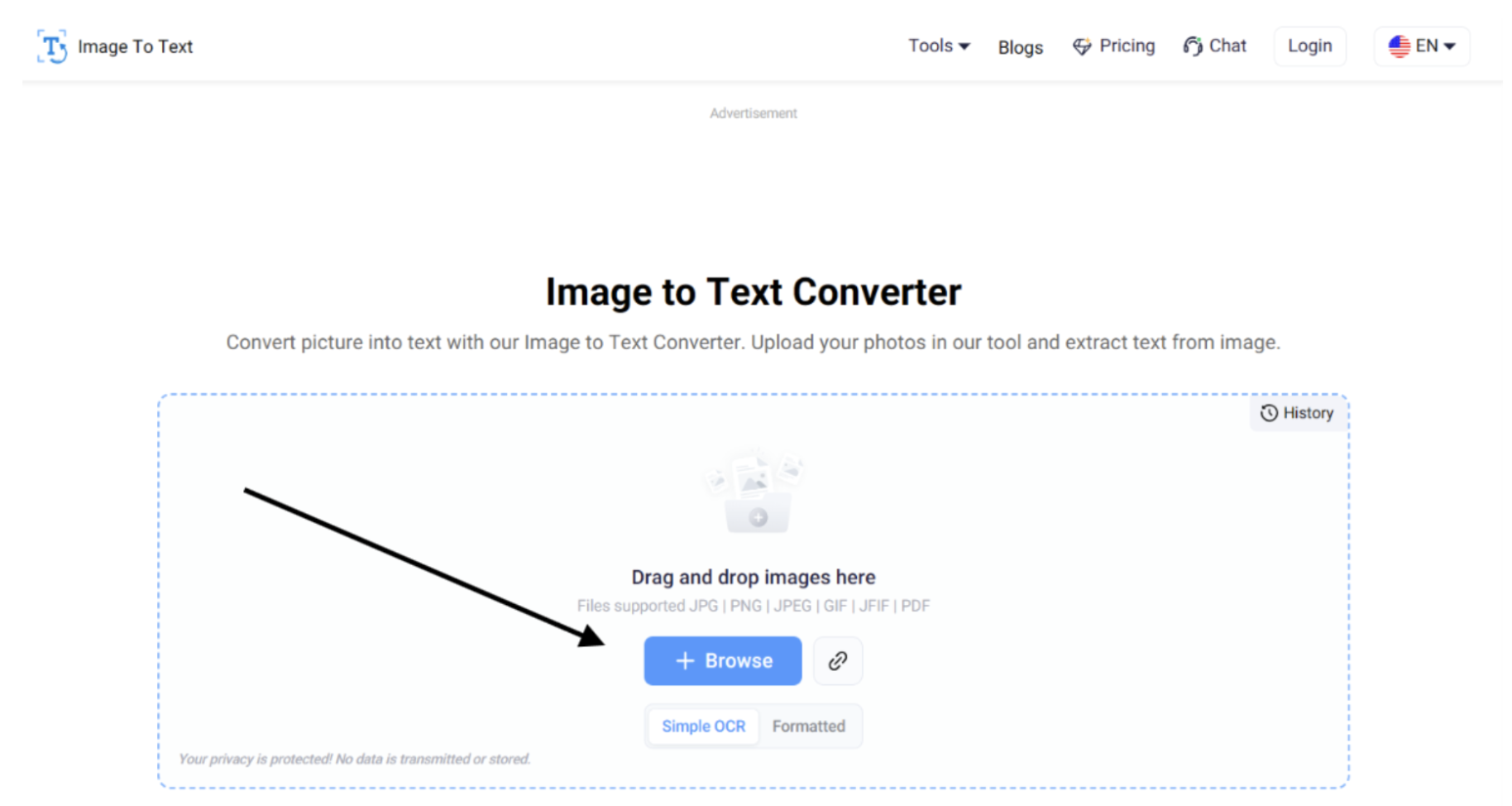
(Source Link: https://www.imagetotext.io/)
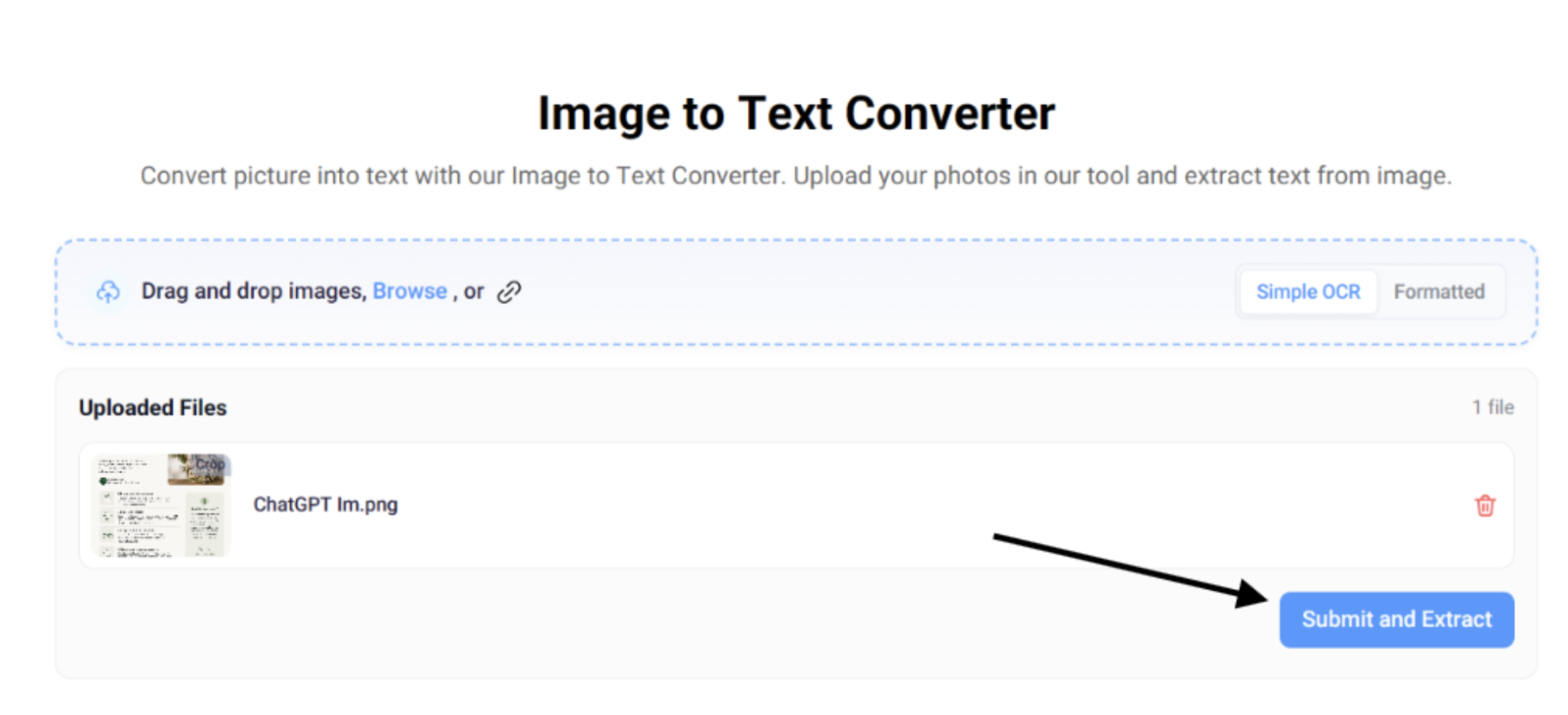
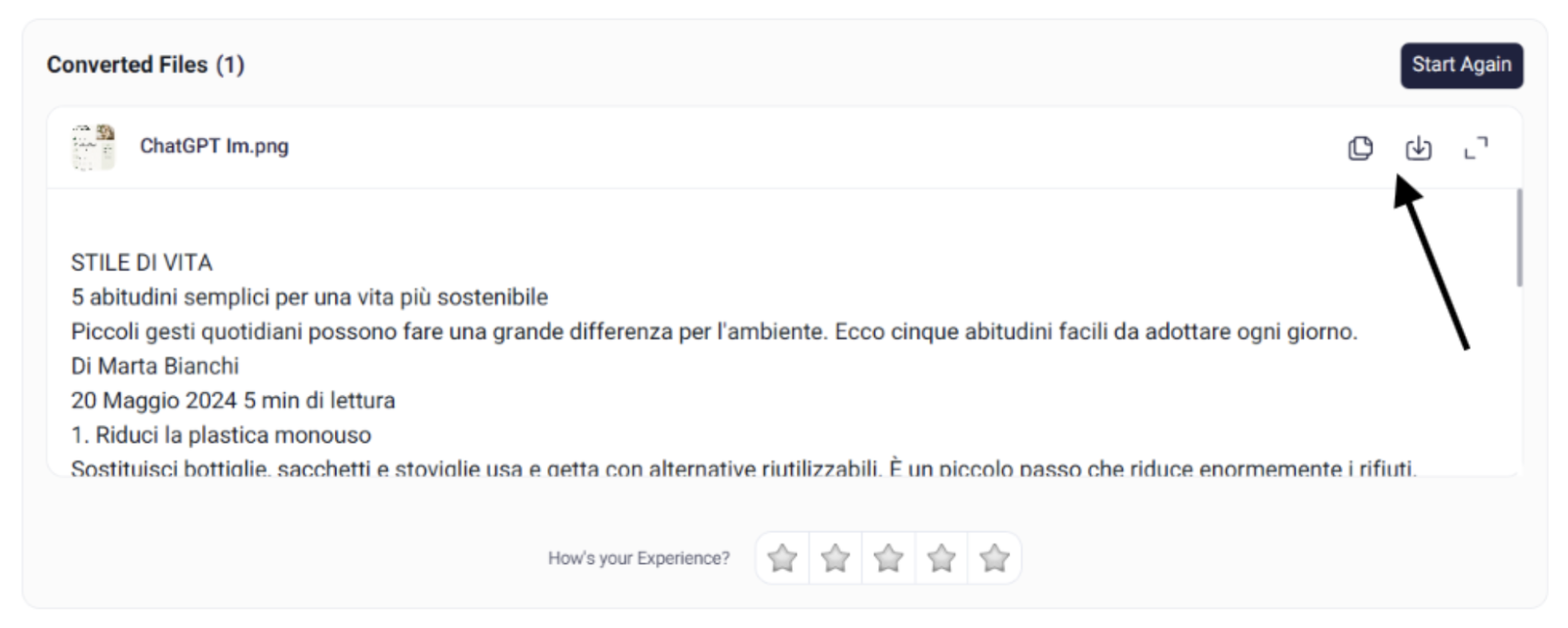
After uploading, click on the “Submit and Extract” button. The tool will start extracting text from the image, and within a couple of seconds, it will provide you with the extracted text.
Then you can copy the output to the clipboard or download it using the specified buttons.
Almost all such tools work in a similar way. So you can choose any tool that suits your needs.
Key Advantages of Digitizing Documents
There are many practical, real benefits to digitizing documents for any business. Here are the main ones.
Easier Document Access
Once files are digital, you can open them anytime, anywhere. No need to be in the office or searching in a cabinet. Just open the file on your phone, laptop, or desktop when you need it.
Faster Search and Retrieval
Finding one paper in a pile of files takes much time. Digital files are the solution. Just enter a keyword, and you’ll locate what you need in seconds. Also, searching for a certain line or words in a document becomes easier. You don't have to read the whole file. You can search specific lines in a 40-page PDF in seconds.
Better Storage and Organization
Paper files take up a lot of physical space, whole rooms sometimes. Digital files remove that need. Everything sits organized in folders on a server instead.
Improved Collaboration and Productivity
Sharing a paper document with a team is difficult. It has to be passed physically around. Digital files can be shared and edited by several people at once, and the work moves faster.
Enhanced Backup and Disaster Recovery
Paper can easily be damaged by environmental conditions. Or you can just put it somewhere and forget about it. Digital files can be backed up. This helps preserve important information even if the original paper records are damaged or lost.
Common problems of document digitization
It is easy to talk about digitization, but in practice, companies face some real challenges.
Low Image Quality and OCR Accuracy
Some documents cannot be scanned 100% accurately. Old papers fade, and some have stains or creases. Handwritten notes are even harder for OCR tools to read properly. Wrong text extraction, missing words, and wrong characters are the results of blurry or unclear scans. That means someone has to go back and correct errors manually.
Processing Large Amounts of Documents
Businesses that have been around for years often have a lot of paper records. It takes proper planning to scan and convert all of that. They can not just start randomly. Without some kind of clear system, some files are missed, some are duplicated, and the whole thing gets messy and takes way longer than expected.
Concerns Over Data Security And Privacy
Digital documents need protection too. The sensitive business data, like contracts, client records, etc., may be at risk of not being stored securely.
Also, using online tools for document digitization is another data privacy concern. Tools can store sensitive business data and can be wrongly used in the future.
Organizing Files
Scanning paper into digital files is only half the job. The other half is keeping them in order. Without a consistent naming scheme and proper folder structure, digital files are just as messy as the old paper cabinet used to be, only in a different form. If this step is skipped, it will be hard to find a specific file again.
Best Practices for Effective Document Digitization
A few simple practices make the entire digitization process smoother and really worth it.
High-Quality Document Scanning
Scan or photograph documents in high resolution, straight and clear, with no shadows or blurring. The better the quality of the scan, the better the OCR results later. It will save a lot of manual fixing work afterwards.
Organize Files Using a Clear Naming Convention
Avoid saving files under random names or numbers. Use an appropriate naming system, something that tells you what the file is just by looking at the name. It makes it a lot easier to search and manage files later on.
Check Accuracy of Extracted Data
Always double-check the output of the tool. Run through the extracted text once, compare it to the original document, and fix anything that looks wrong before you actually use that file for real work.
Regularly Back Up Your Digital Documents
Digital files can be accidentally deleted, corrupted, or lost due to hardware failure. So, keep regular backups on the cloud or in separate storage so important records stay safe no matter what happens.
Final Words
When done right, document digitization saves a lot of time, space, and hassle. The advantages are real and worth the effort that businesses put into it.
But it is not without its challenges. Poor scans, large volumes, and security concerns all need proper attention along the way. A few best practices, good quality in scanning, proper naming, and regular checking and backups make the whole process much smoother.
If your business still has piles of paper files, now is a good time to start digitizing them.
Keywords:
Document Digitization
,


