The Evolution of Business Documents: Templates to AI
13 Nov 2026
13 Nov 2026
min read
The Evolution of Business Documents: From Templates to AI-Powered Experiences
Do you remember the last time you stared at a blank page before drafting a contract?
Most business owners know the feeling of not being able to think of what to type when drafting a business document. Many times, you may have felt that way.
Business documents underpin every deal, hire, and partnership you make. But many business owners still create these documents the old way, which is time-consuming and prone to errors.
As AI advances, the way businesses create, review, and manage documents is evolving. By understanding this shift, you can streamline drafting, improve consistency, and reduce avoidable errors.
This article discusses each stage in the evolution of business documents. By the end, you will know where your workflow stands and how you can transform it.
What Are Business Documents & Why Do They Keep Evolving?
Business documents are formal records that communicate or support the activities and decisions of an organization. They include contracts, NDAs, proposals, invoices, and HR policies.
Each document is crucial. A missing clause can cost you a lost client, a dispute, or a penalty.
That pressure explains why business documents keep evolving. Many teams now work remotely, deals close faster, and laws vary across borders. As business operations become more complex, businesses need ways to create accurate documents more quickly and efficiently.
Example: Consider a five-person agency signing 10 client contracts a month. If each contract takes three hours, that is thirty hours gone. Reducing that time matters because it frees up hours for more important work.
Smart teams already treat paperwork as a growth tool. Many experts use documents to streamline business operations and grow faster.
Now that you know what business documents are, let's trace how they got here.
How Business Documents Evolved: From Blank Pages to AI
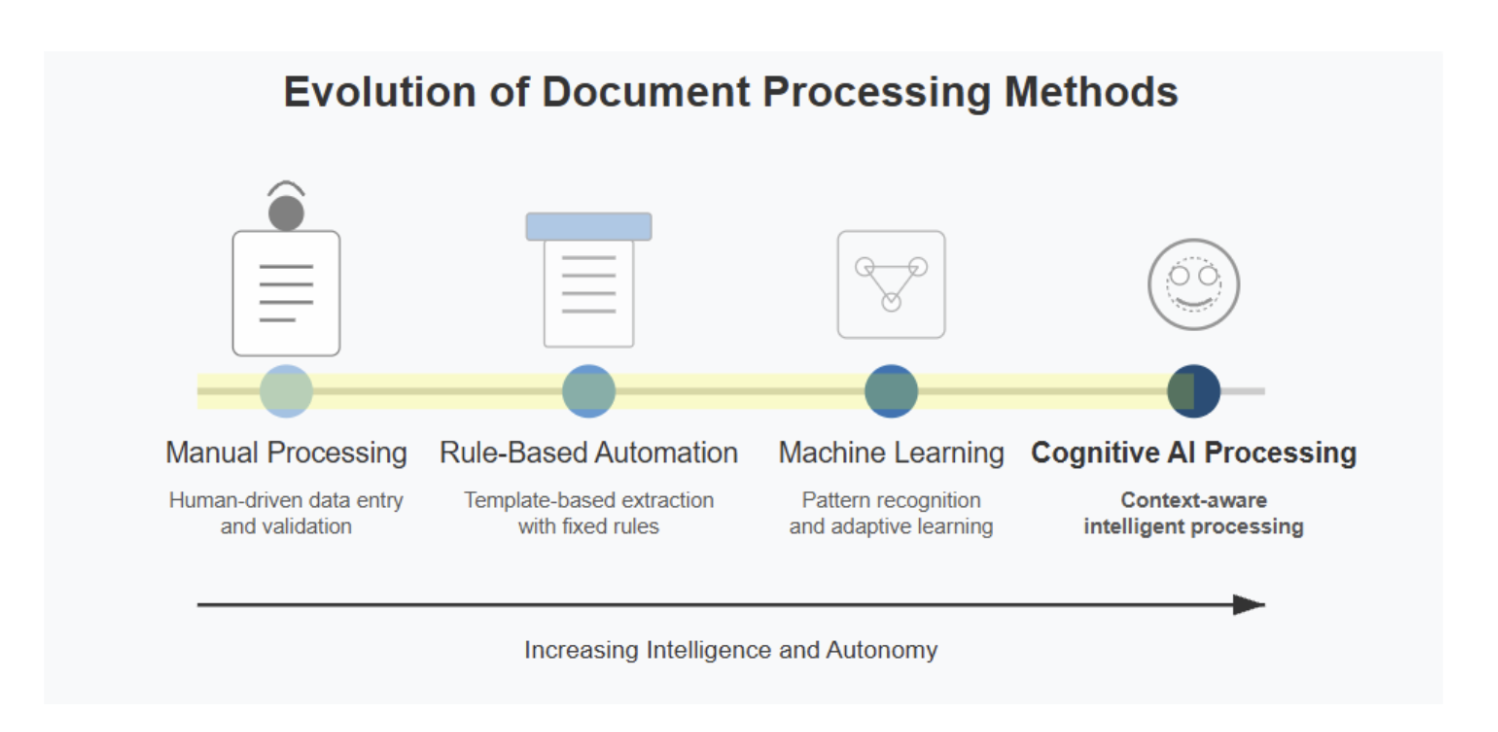
The journey consists of five clear stages. Each stage fixed one problem and then exposed the next.
1. The Blank-Page Era: Drafting Everything From Scratch
For decades, every document started with an empty page. You typed each contract line by line on a typewriter or early word processor.
This approach had clear problems:
- It took hours, even for routine documents.
- Quality depended on one person's memory.
- Small errors slipped through because nobody checked against a standard.
Example: A shop owner drafting a supplier agreement often copied clauses from an old deal. Those clauses rarely fit the new supplier.
The lesson was simple. Businesses needed a reliable starting point rather than a blank page.
2. The Template Era: Reusable Starting Points
Templates changed the game. Instead of writing from scratch, you filled in the blanks on a pre-built document.
Templates brought three big wins:
- Speed: You drafted in minutes instead of hours.
- Consistency: Every employee used the same structure and wording.
- Lower cost: Routine documents no longer needed a lawyer every time.
But generic templates came with limits. A one-size-fits-all NDA rarely fit a two-way partnership or another country's laws.
Example: A startup founder downloaded a free employment contract online. Later, the founder learned that it followed another country's employment laws. Companies looking to hire employees internationally need to make sure employment terms comply with the laws in the worker’s actual country, especially when they don’t have a local entity there. Now they needed a lawyer anyway.
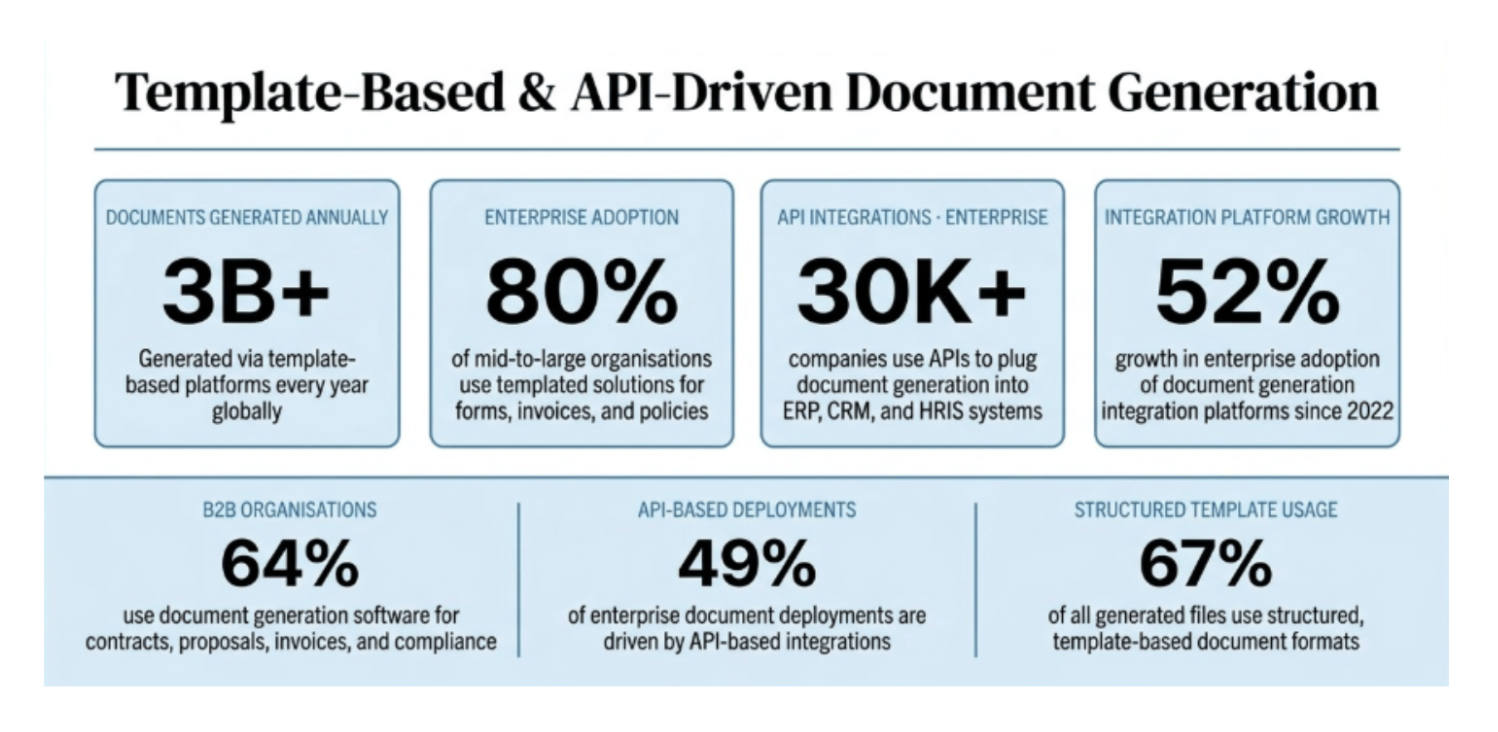
That gap pushed businesses toward trusted template libraries drafted by lawyers. DocPro, for instance, offers 2,800+ lawyer-drafted templates across 100+ document categories.
3. The Digital Era: Cloud Storage, PDFs, and E-Signatures
Next, documents moved off paper and onto screens. Cloud storage let teams edit, share, and store files from anywhere.
Key changes in this stage:
- PDFs became the standard format for sharing final versions.
- Version history ended the "final_v3_REAL" file chaos.
- E-signatures removed the need to print, sign, and scan.
- Shared links replaced long email threads for team reviews.
PDF formats have now become the most popular. It's the preferred business format for final files.
Example: A remote HR team sends offer letters as PDFs for e-signature. The new hires sign from a phone within an hour.
Still, digital files created a new mess: scattered folders and lost versions. Smart digital document management can help you avoid that clutter.
4. The Guided Era: Smart Templates That Ask the Right Questions
Static templates still left you guessing which clause to pick. Guided templates fixed this by asking you questions first.
Here's how guided customization works:
- You pick a document type, such as an NDA or service contract.
- You answer simple questions about the parties, terms, and jurisdiction.
- The platform builds a tailored draft based on your answers.
This approach cuts guesswork because each clause reflects your specific requirements.
DocPro follows this model with step-by-step customization and a multi-jurisdiction engine. You choose your governing law as a part of the process. You can also search DocPro's library by type or category.
Example: A freelance designer needs a unilateral NDA. Instead of editing a generic file, the designer answers a few questions. The finished NDA names the right parties and the chosen governing law.
5. The AI Era: Documents Become Interactive Experiences
AI is reshaping how you create and edit business documents. You no longer start with a blank page or even a fixed template.
According to Gartner, by 2027, GenAI and AI agents will create the first true challenge to mainstream productivity tools in 30 years, prompting a $58 billion market shakeup. Gartner also notes that developing new content increasingly starts with AI synthesizing information.
AI-powered documents let you:
- Draft from a prompt: Describe the deal to an agent, and the AI will suggest a first draft. Businesses looking to take this further can also explore CISIN's AI development services, which cover custom AI solutions designed to support business workflows and automation.
- Review faster: AI flags missing clauses, risky terms, and inconsistencies to ensure security.
- Rewrite on demand: Adjust the tone or simplify the language according to a document’s requirements.
- Summarize long files: Key terms are easy to find without reading fifty-page documents.
Want to explore tools in this space? Compare the top AI legal tools for contract drafting and review.
Example: A sales manager enters deal details into an AI tool before a client pitch. The tool produces a structured proposal draft. The manager then refines pricing and scope instead of writing every section.
However, AI works best on a solid foundation. A draft built on lawyer-reviewed templates starts from vetted language. So, human review still matters, especially for legal terms.
Where Does Your Document Workflow Stand Today?
You don't need to jump every stage at once. First, find where you stand right now:
- Are you copying old files and editing clauses by hand? Then you're in the blank-page era.
- Are you using free generic templates? Then you're in the template era.
- Are you storing and signing everything online? Then you've reached the digital era.
- Are you answering guided questions to build tailored drafts? Then you're in the guided era.
- Are you drafting and reviewing with AI support? Then you're a part of the newest wave.
Each step forward saves time and removes risk.
Here's how to move ahead to one stage at a time:
- Swap copied old files for lawyer-drafted templates.
- Store every final version in one shared cloud folder.
- Use guided questions to tailor each new contract.
- Test an AI tool for first drafts and clause reviews.
- Keep a human check before anything gets signed.
Choose the next stage that fits your workflow and start moving toward it. Quick tip before you finalize any business document: run it through a Word Counter to check length, word count, and character limits. Many contracts, proposals, and RFP responses must fit strict page or word caps, and going over can get your submission rejected. A free online word counter helps you trim fluff, tighten clauses, and stay within requirements. It's a small step that keeps documents clean, compliant, and easy to review.
Are You Ready to Upgrade Your Business Documents?
Business documents have come a long way. They moved from blank pages to templates, cloud files, guided builders, and AI-powered experiences. Each stage made drafting faster, cheaper, and more accurate.
The best part is you can benefit from this evolution right now. Start with lawyer-drafted templates, customize them step by step, and let AI speed up reviews.
Want to create your next contract in minutes? Explore DocPro's templates and start building smarter documents today.
Keywords:
Business Document Evolution, Ai Business Documents, Ai Contract Drafting, Document Templates, Lawyer-drafted Templates, Guided Document Templates, Digital Document Management, E-signatures, Contract Drafting Workflow, Ai Legal Tools
,


