The Future of Business Documents: How AI Is Changing the Way We Work
28 Oct 2026
22 Oct 2026
min read
The Future of Business Documents: How AI Is Changing the Way We Work
Ask any random person in an office how their week went and you'll hear about documents almost automatically. A proposal that has to go out by Friday. A contract still sitting with legal. That monthly report that eats up most of a Tuesday afternoon. None of it is especially difficult. It just takes forever.
And for a long time, nothing about that routine really changed. You opened last quarter's file, copied the numbers in from a spreadsheet, fixed the fonts that broke, and emailed it around. Then you waited for comments.
That's where AI has started to help. People still write and approve the documents. They just spend a lot less time on the dull parts than they did a few years back.
How AI Is Changing the Way We Handle Business Documents
Self - Generated
Most offices already use AI in some form. In McKinsey's 2026 State of AI survey, nearly 9 in 10 respondents said their organizations regularly use AI in at least one business function.
Faster Drafting and Smarter Summaries
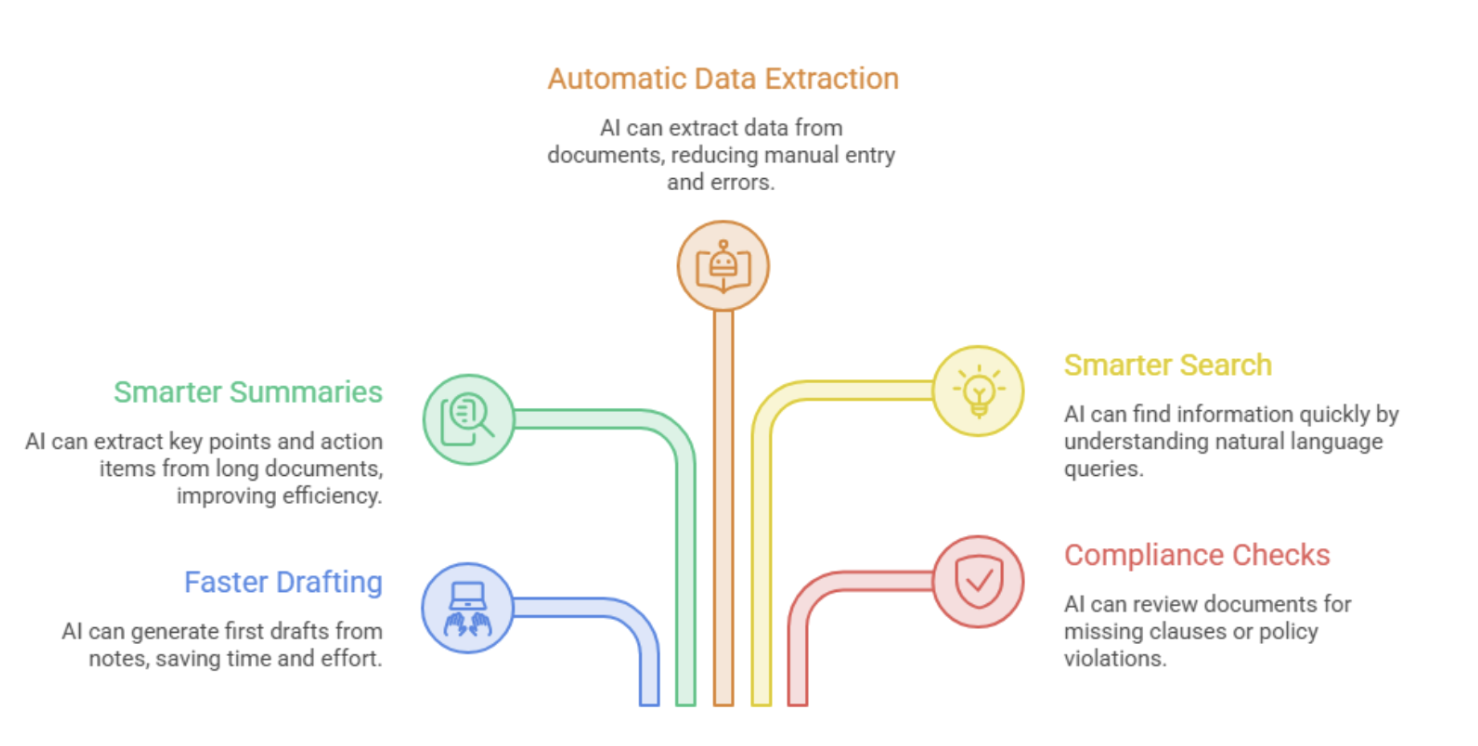
The first draft has always been the slow bit. These days, a sales rep can jot down a few notes after a client call and have a rough proposal to work with a minute later. Someone still has to fix the tone and add the details only they know, but fixing a rough draft is a lot quicker than writing one.
AI can turn a fifty-page report into a short list of key points and action items.
Some teams are also turning written material into audio. Documents, such as training guides, policy updates, and product walkthroughs, can be read out in a clear voice by using an AI voice generator.
People can play them during a commute or between calls. Murf, for example, is a complete AI voice platform that offers:
- Text-to-speech to turn written documents into audio
- AI voice agents to take care of routine calls and chats
- Conversational AI so people can ask questions and get spoken answers
- Voice APIs to add voice to the software your business already uses
Automatic Data Extraction
Small mistakes can occur when someone is inputting figures from a PDF into another system, which nobody likes to do.
AI is now capable of reading purchase orders, invoices, and receipts, selecting names, dates, and amounts, and sending the information to the HR or accounting software. This approach, known as intelligent document processing, combines AI and automation to turn unstructured documents into usable business data. A finance team processing a few hundred invoices a month may only need to check the entries the system flags as unusual.
A finance team with a few hundred invoices a month only checks the entries the system marks as odd.
|
Task |
Traditional Approach |
AI-Assisted Approach |
|
Writing a first draft |
Hours of writing or editing old templates |
Draft generated from notes, then refined by a person |
|
Reviewing long reports |
Reading every page manually |
Quick summary first, deep reading where needed |
|
Processing invoices |
Manual data entry |
Automatic extraction with human spot checks |
|
Finding past information |
Searching folders and old emails |
Asking a question in plain language |
|
Checking contracts |
Line-by-line review by legal |
Risky or missing clauses flagged for review |
The Future of Business Documents in an AI-Driven Workplace
Self - Generated
What we've covered so far is already happening. The bigger changes are still ahead, both in what documents can do and in how people work with them.
Documents That Keep Themselves Up to Date
Right now, a document is mostly a file that sits still once it's saved. That probably won't last.
A sales report might pull fresh numbers from your systems every morning, so nobody has to rebuild it at the end of the month.
Making business documents update automatically often requires software that connects data sources, business applications, and internal workflows. Companies looking to build these capabilities can work with Appello Software's custom software development team.
Similarly, a price list could update the moment a product cost changes. The file becomes something closer to a live dashboard than a PDF in someone's inbox.
Documents You Can Ask Questions
Long manuals are likely to change as well.
Instead of scrolling through 40 pages, an employee could ask the HR policy how many leave days roll over into next year and get the answer faster. Tools such as iTacit's AI-powered digital assistant can help frontline employees find answers in company policies and standard operating procedures, making workplace knowledge easier to access.
The same idea works for contracts. A manager could ask, "When does this agreement end, and what's the notice period?" and get a clear answer in seconds.
Personalized Documents for Every Reader
Today, most people get the same version of a document whether it applies to them or not. That is starting to shift.
A new hire's onboarding pack could show only what fits their role, team, and office. A client proposal could adjust its examples to a client's industry. This way, people read less and find what they need faster.
Built-In Review and Compliance Checks
Checking will also move earlier in the process. Before a document goes out, AI can give it a once-over and catch a missing clause, a mismatched date, or a line that goes against your company policy.
Contracts could even carry a short summary on top and send a reminder a month before renewal.
That works best when your team begins with well-designed templates. This list of the most downloaded forms and agreements shows which documents businesses use the most, and those are usually worth standardizing first.
How Each Department Will Feel the Change
Not every team will see the same changes. Sales teams may use AI to prepare personalized proposals and follow-up messages, while an email sending service can handle the delivery of those customer communications. It mostly depends on which documents land on their desks.
|
Department |
Common Documents |
Where AI Helps Most |
|
Sales |
Proposals, quotes, follow-up emails |
Personalized drafts based on client details |
|
Finance |
Invoices, expense reports, budgets |
Data extraction and error detection |
|
Human Resources |
Job descriptions, offer letters, policies |
Consistent templates and faster onboarding |
|
Legal |
Contracts, NDAs, compliance records |
Clause review, comparison, and risk flagging |
|
Operations |
SOPs, reports, meeting notes |
Summaries and action items |
Changing Roles for Employees
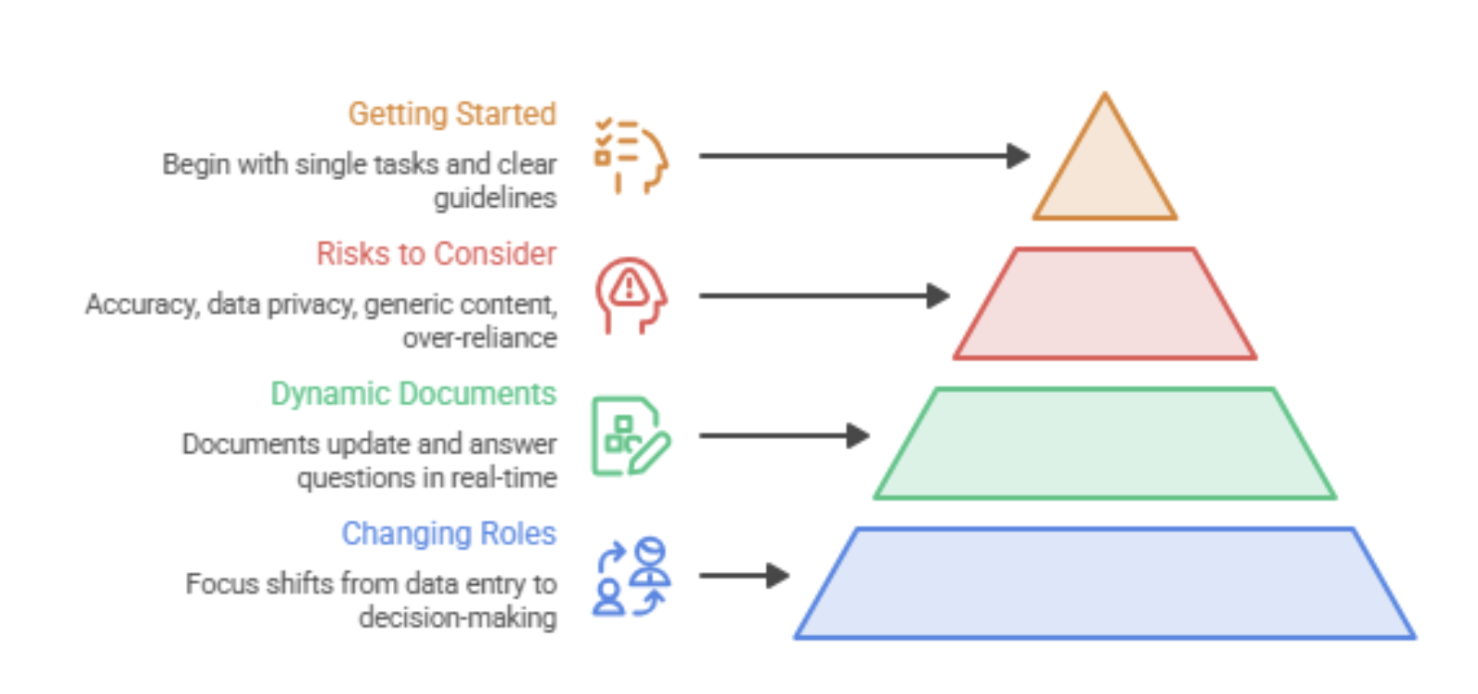
Some people fear AI will wipe out jobs centered around paperwork. In most offices, that isn't what's happening. The formatting and data copying are shrinking, and the parts that need a person are staying:
- Deciding what a document should say
- Checking facts and figures
- Understanding clients, context, and tone
- Making judgment calls software cannot make
More of the day now goes into editing than typing. Anyone who can tell an AI tool clearly what they want, and can spot when it gets something wrong, has a skill almost every office needs.
Risks to Keep in Mind
AI does bring some problems along the way, mostly when people use it in a hurry.
- Accuracy: AI may seem extremely certain but still be in error. A human must verify anything that is important.
- Data privacy: It's risky to paste employee information, contracts, or customer files into a program that your business hasn't authorized.
- Generic content: Documents begin to sound similar when everyone uses the same tools. Real knowledge of your business and your own voice make yours stand out.
- Over-reliance: Once people stop reading closely, something awkward will eventually go out with your logo on it.
How to Get Started the Right Way
A company-wide launch on the first day is not necessary. It's important to understand what a solid contract, policy, or agreement should include before asking AI to develop one. These business document guides are a handy place to learn that.
- Begin with a single repeating task: Processing invoices or meeting summaries are ideal starting points.
- Establish explicit usage guidelines: Determine which tools are permitted and what data can be entered into them.
- Keep a person involved: You should review all financial, legal, and client-facing documentation.
- Educate your group: Weeks of trial and error can be avoided by spending an hour crafting clear instructions.
- Calculate the outcomes: To determine what is truly paying off, keep track of the time saved and errors discovered.
Final Thoughts
People will keep writing business documents. AI mostly takes over the copying, retyping, and searching for old files. Teams that use it well send documents out sooner, make fewer mistakes, and get time back for work that needs a person's thinking.
A good way to see AI is as a fast new team member whose work you still check. Let it write the first version, keep a person responsible for the final one, and be careful with facts and private data.
Your team can use DocPro's ready-to-use templates for contracts, agreements, and rules as a better place to start. Whether the draft is generated by AI or by a human, starting from a decent template reduces errors and saves time.
Keywords:
Ai Business Documents, Ai Document Drafting, Intelligent Document Processing, Ai Contract Review, Future Of Business Documents, Automated Document Workflows, Ai Summaries, Document Automation
,


